
Making deals feel like deals again
Redesigning Amazon’s Deals Experience
An 18-month design plan to rebuild Amazon's deals experience: from a static grid that showed everyone the same thing, to a personalized, modular system the whole company could experiment on.
+$119.5M
incremental annualized revenue worldwide
+$111.2M
incremental annualized deal revenue
+$16M
incremental annualized total revenue
8 → 2
deal displays, one badge system everywhere
Problem
Today's Deals was a grid of static products, and every customer saw the same one. Shoppers told us it felt stale, and finding something relevant meant digging through filters or giving up and searching.
Under the hood it was worse. There were eight different ways to display a deal, each one tied to the internal deal type. Lightning Deals always showed a countdown. Best Deals never did, even in their final hour. Nothing was personalized, nothing was easy to test, and the big "sizzle" deals had to be merchandised by hand.
Engineering was already re-architecting the deals platform. That gave design a rare window: if the new experience was planned alongside the rebuild, we could ship a foundation built for experimentation instead of patching the old grid again.
Deals were organized around how they were created, not around the person shopping.
A plan we could actually ship,
not a vision deck.
Every concept had a customer need, a "how we'll get there," and a launch window (Black Friday 2020 or Prime Day 2021) sized against the re-architecture and real headcount. Bigger bets like pre-ordering and gamification were split out for separate exploration. The work rested on a handful of principles the team agreed on up front:
1
A deal is a perception. Coupons, price drops, Prime discounts and price matches are all "a deal" to the customer. Our org chart doesn't get to split them up.
2
Trust beats hype. Never make a deal look better than it is. Urgency only shows up when it's true.
3
Shopper first. Deals serve brands and customers. When we have to choose, we choose the customer.
4
Price isn’t the whole deal. 5% off a product you want from a brand you trust can beat 30% off something you've never heard of.
Solution
Eight deal displays
down to two
One layout for single-product deals, one for multi-product deals. I broke a deal down into its parts (status, image, savings, price, social proof, call to action, urgency) so each attribute could appear only when it helped the customer decide, instead of whenever the deal type said so.
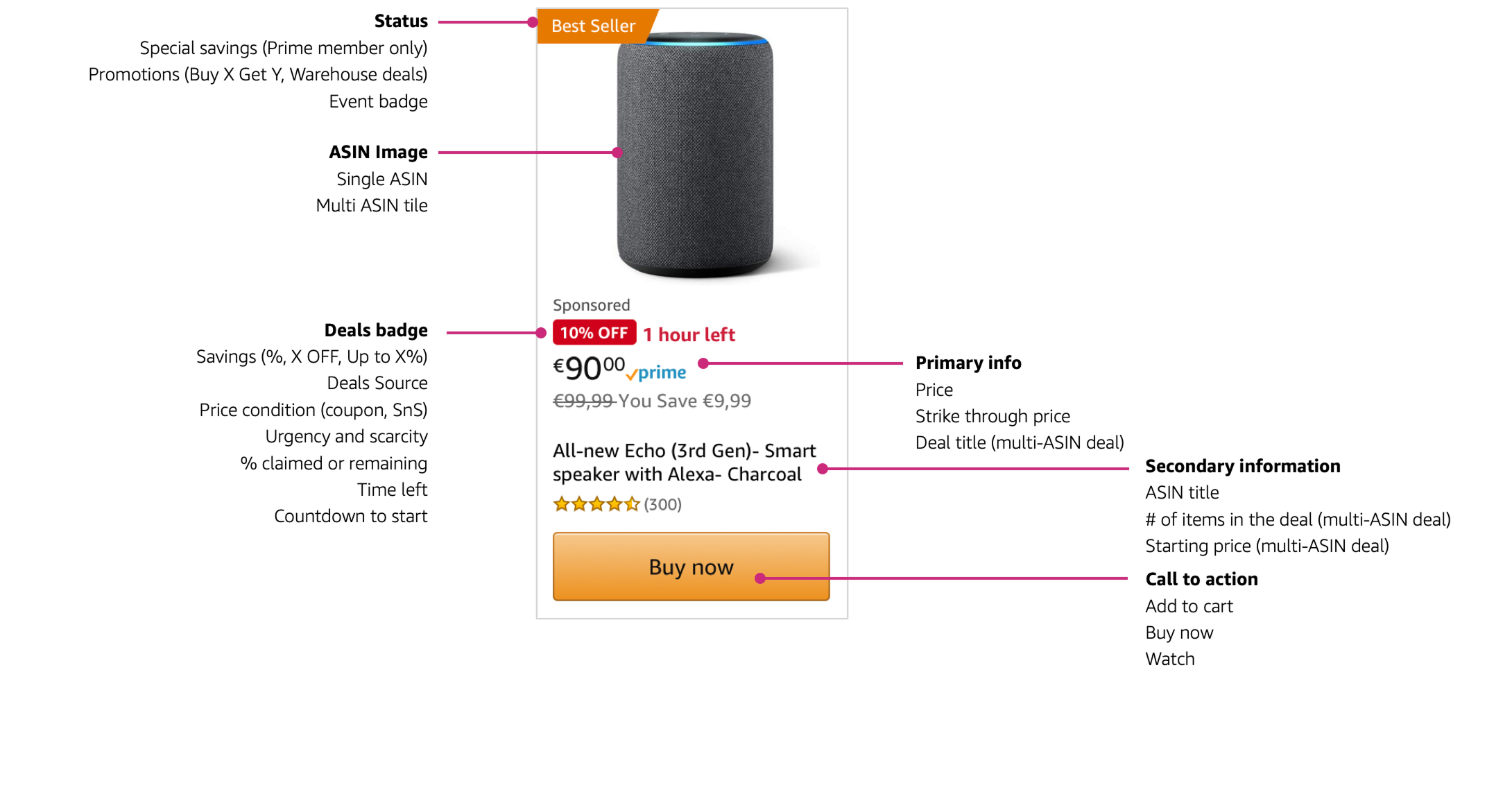
Anatomy of a deal: seven attributes, each shown only when it earns its place.
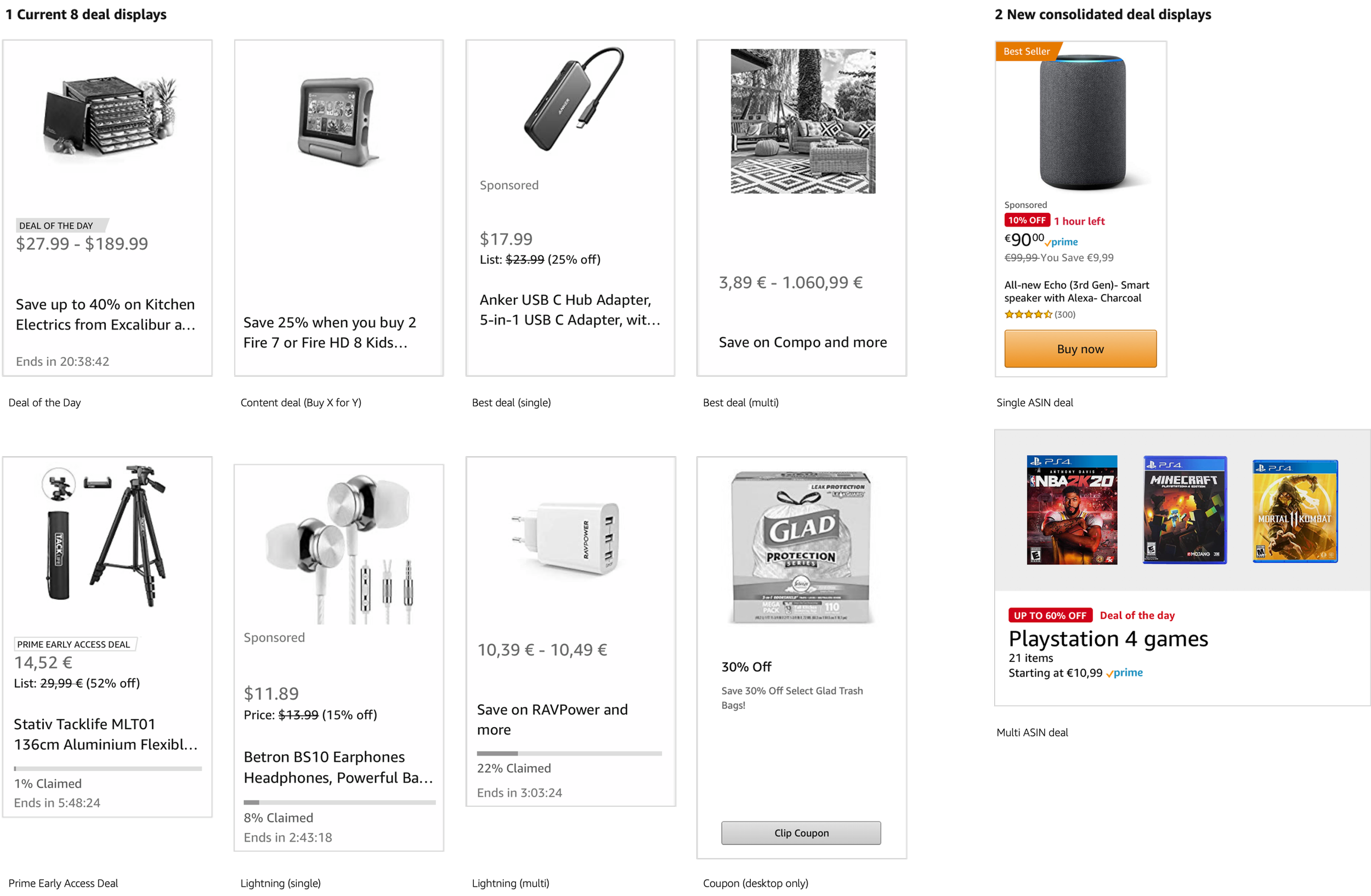
Before: eight displays driven by deal type. After: two, driven by what the shopper needs to know.
Solution
From one grid to a personalized feed of cards
The grid became a feed of modular cards: top and trending deals first, then cards based on what you've browsed, brands you follow, what's ending soon, and savings tiers. Navigation cards sit between them to help people narrow down. Because cards are modular, other teams could build and test their own without waiting on us.
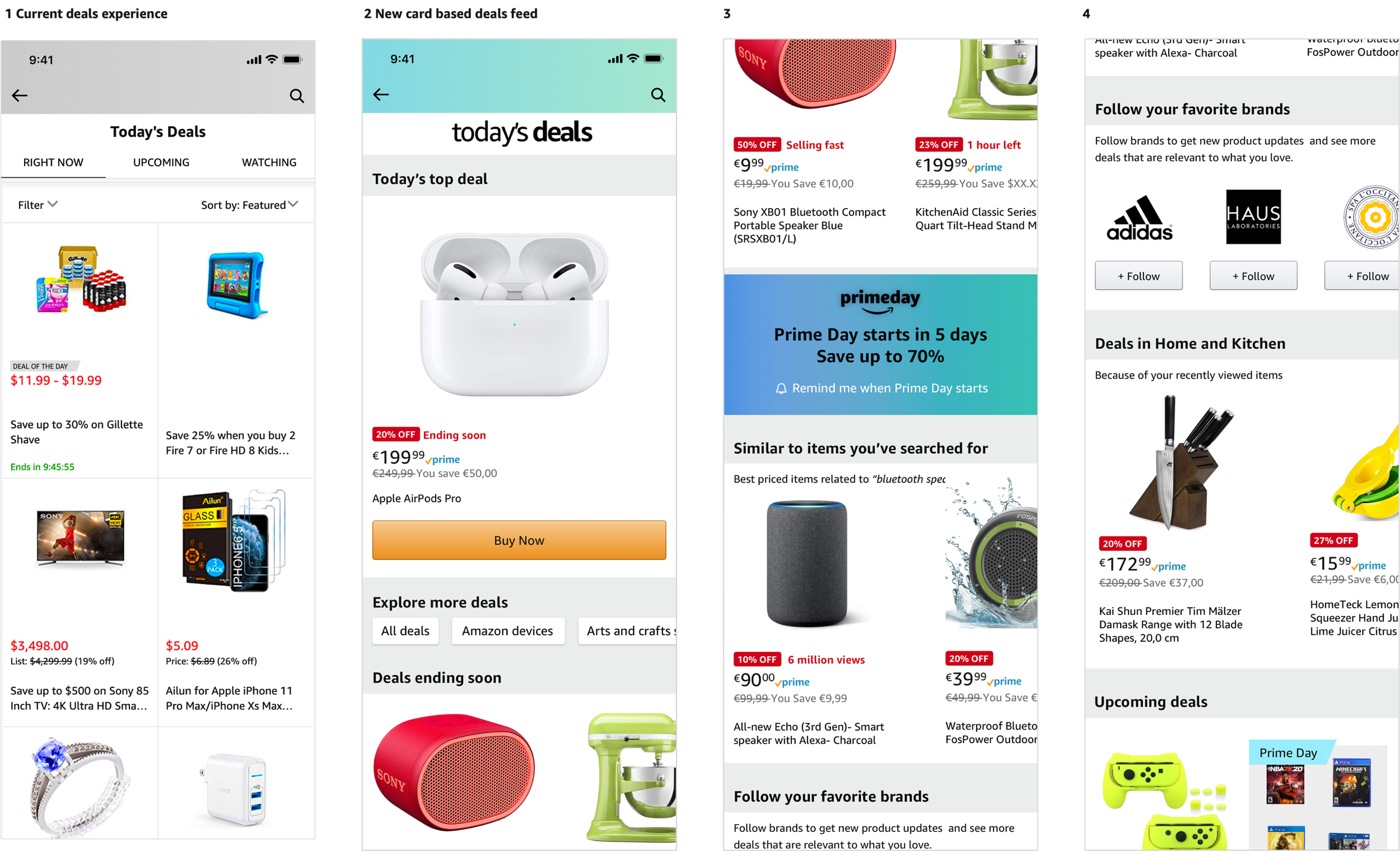
The old grid (left) next to the new card-based feed.
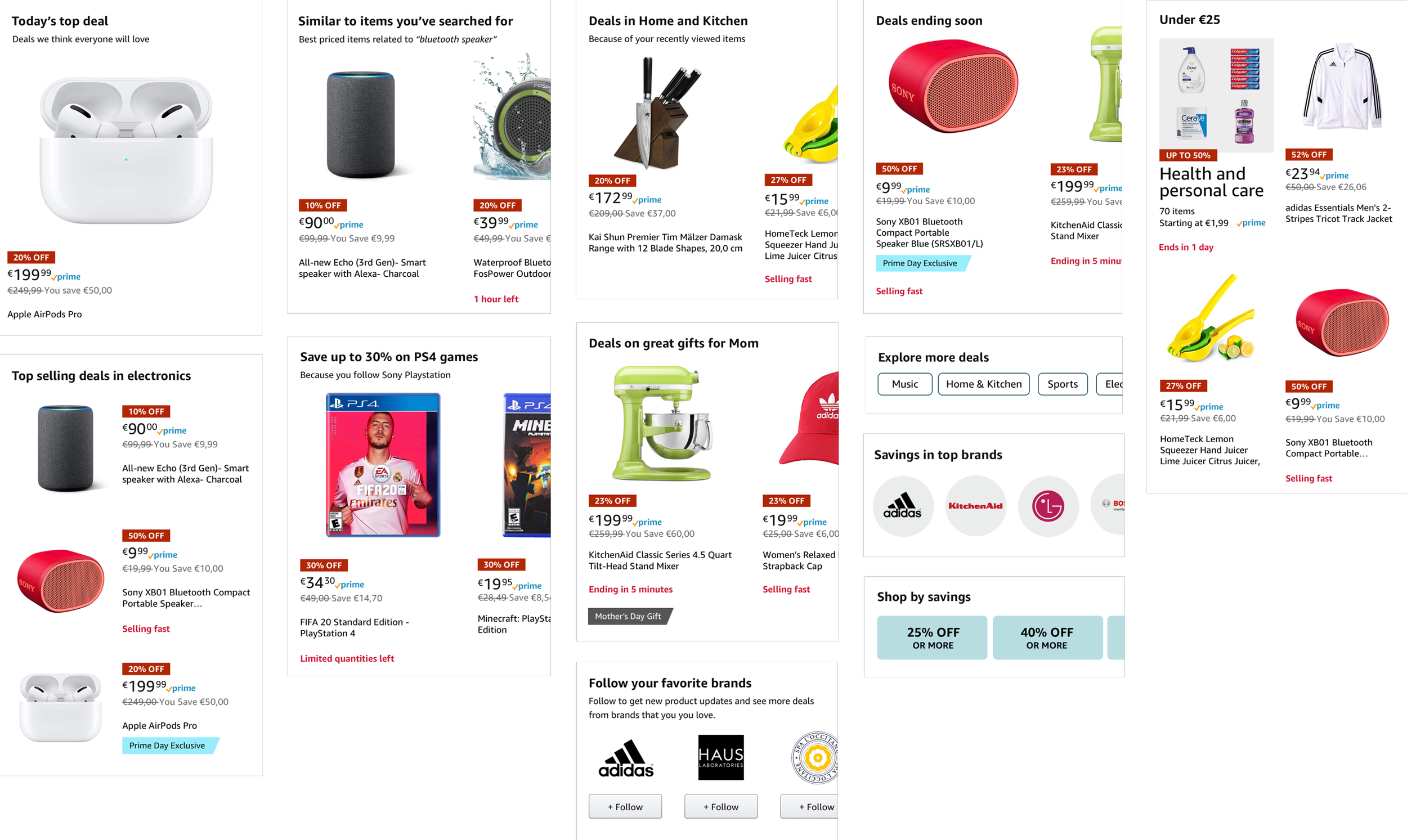
A starter library of card types, built to be tested and extended.
Solution
Urgency only when it's real
We moved urgency and scarcity messaging to the moment a deal is actually close to ending or selling out, for every deal type, and set up experiments on counters, iconography, type and color to learn what people trust.
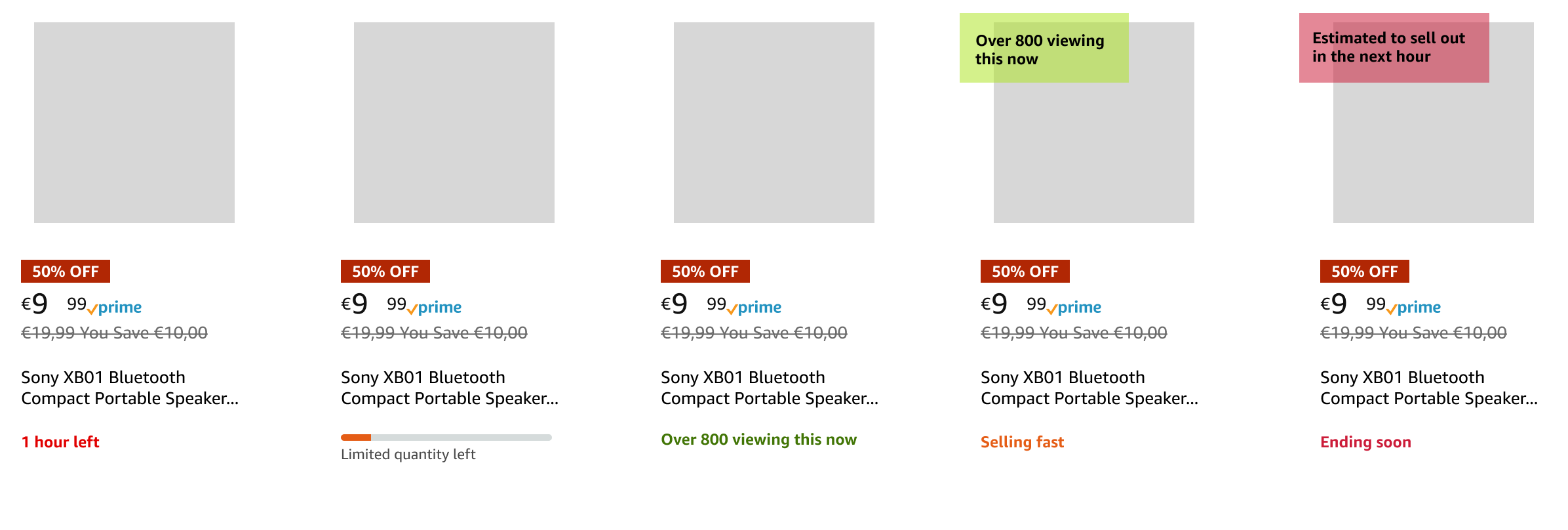
Early urgency and scarcity explorations.
Solution
Dynamic deals badging
A deal isn't static, so its badge shouldn't be either. I designed a badging system that leads with value and supports it with context. The savings is always the primary signal. The secondary signal changes with the deal's state: Starts in 4 hours, then Trending, then Today's top deal, then Ending soon or Only a few left.
I defined the states, variants and rules behind each one, including countdowns and inventory thresholds, and tested two structures: status combined with the savings badge, and status on its own line below. As deals picked up conversion signals, top performers were promoted automatically to Trending or Deal of the Day.
The same badge behaves the same way in Search, Category, product pages and Today's Deals. That only worked because we aligned Search, Retail and Prime/Events on a single deals API as the source of truth.

Badging logic
